

What is Schema.org JSON-LD?
Schema.org JSON-LD is a machine-readable description of the entities, facts, and relationships already represented by a web page. The vocabulary comes from Schema.org; JSON-LD is the serialization format; and search engines decide which combinations they support for particular features.
On a web page, JSON-LD normally appears inside a <script type="application/ld+json"> element. Google supports JSON-LD, Microdata, and RDFa, but generally recommends JSON-LD because it can be maintained separately from the visible HTML structure. That convenience does not make it a second, invisible version of the page. Google's general structured data policies require the markup to represent the visible main content accurately.
The shortest useful definition is this:
JSON-LD is a typed, machine-readable projection of your maintained page data—not a place to publish claims that users cannot verify.
It can help eligible pages qualify for supported Search features and make explicit relationships such as article → author → publisher. It does not guarantee a rich result, higher ranking, knowledge panel, or citation in an AI answer. Google also says there is no special schema required for AI Overviews or AI Mode; ordinary Search eligibility and quality fundamentals still apply in its AI features guidance.
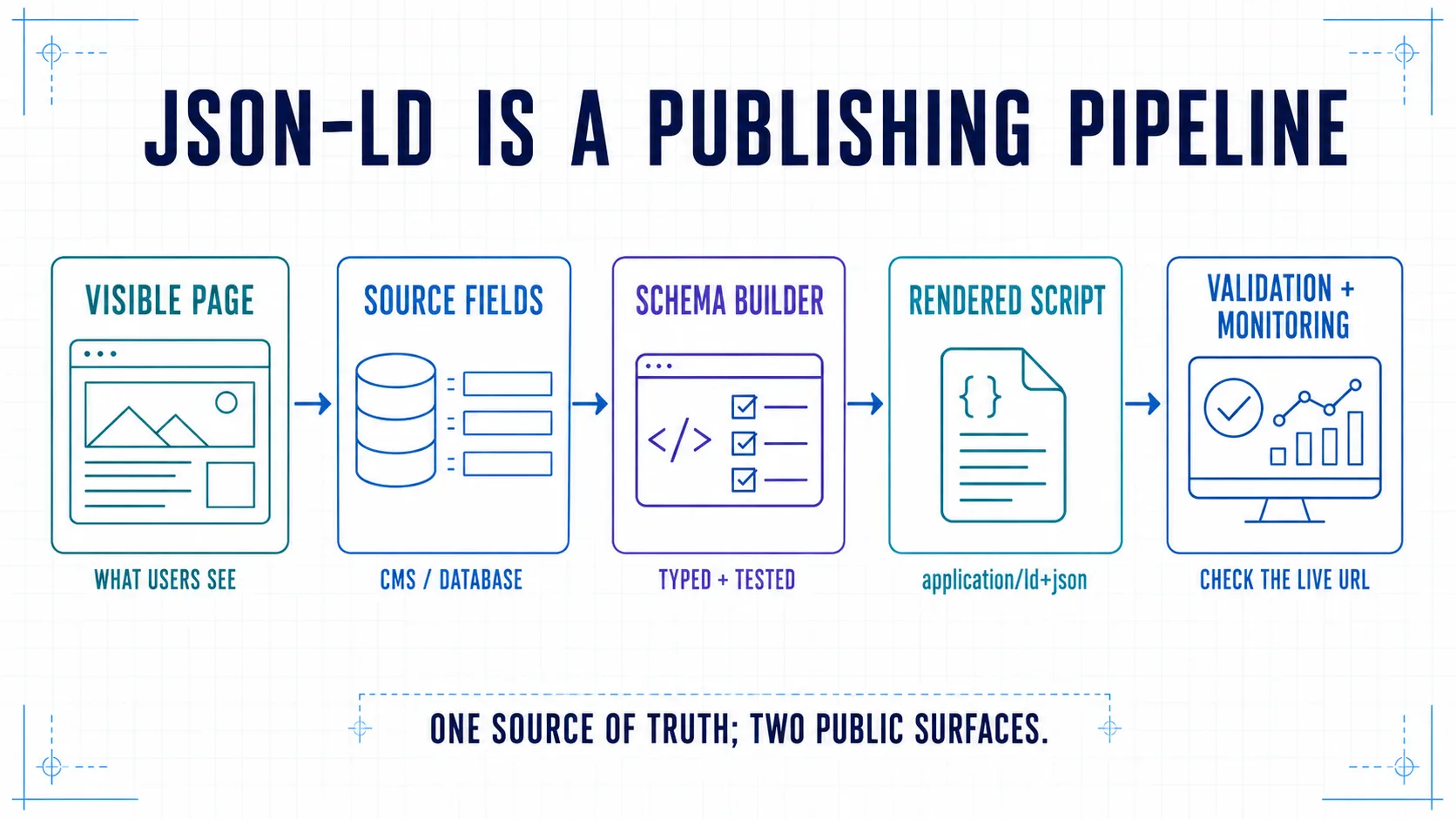
The production process at a glance
- Assign the page purpose, target feature, and owner.
- Choose a Schema.org type that matches the real page.
- Create a visible-fact and source-field contract.
- Define stable identifiers and entity relationships.
- Build the smallest accurate JSON-LD graph.
- Serialize and embed it safely.
- Confirm the script exists in the final rendered page.
- Validate syntax, vocabulary, feature eligibility, and content parity.
- Release with automated checks and monitor drift.
Most implementation failures begin before the first brace. A team copies a snippet, fills gaps with plausible values, and considers the job finished when a validator turns green. A production implementation reverses that order: establish the data contract first, generate the markup from authoritative fields, and test the live output after every template change.
Step 0: define the outcome and the owner
Before choosing a type, record three decisions:
| Decision | Example | Why it matters |
|---|---|---|
| Page purpose | Canonical editorial guide | Identifies the main entity |
| Intended use | Accurate description plus Article eligibility | Separates modeling from feature expectations |
| Owner | Editorial platform team | Gives updates and failures an accountable team |
Write one sentence describing what the page is mainly about: “This is an editorial guide written by AppWebSeo,” “This is the canonical product page for one subscription,” or “This page represents one physical store in Vienna.” If that sentence is unclear, the schema design will be unclear too.
Also inventory every injection point. A theme, SEO plugin, ecommerce app, tag manager, CMS component, and custom frontend may all emit structured data. Choose one owner for each node type. Multiple valid blocks are permitted, but contradictory Organization, Product, or Breadcrumb nodes create avoidable ambiguity.
Step 1: choose the type from the page, then check current support
Use two distinct references:
- Schema.org defines the available types, properties, and relationships.
- Google's Search Gallery documents the structured data types it currently uses for Search features and links to feature-specific rules.
Vocabulary validity and Google feature support are not the same thing. A Service node can be valid Schema.org without producing a special Google result. Conversely, a supported Product type can remain ineligible when the page, properties, or offer violates feature policy.
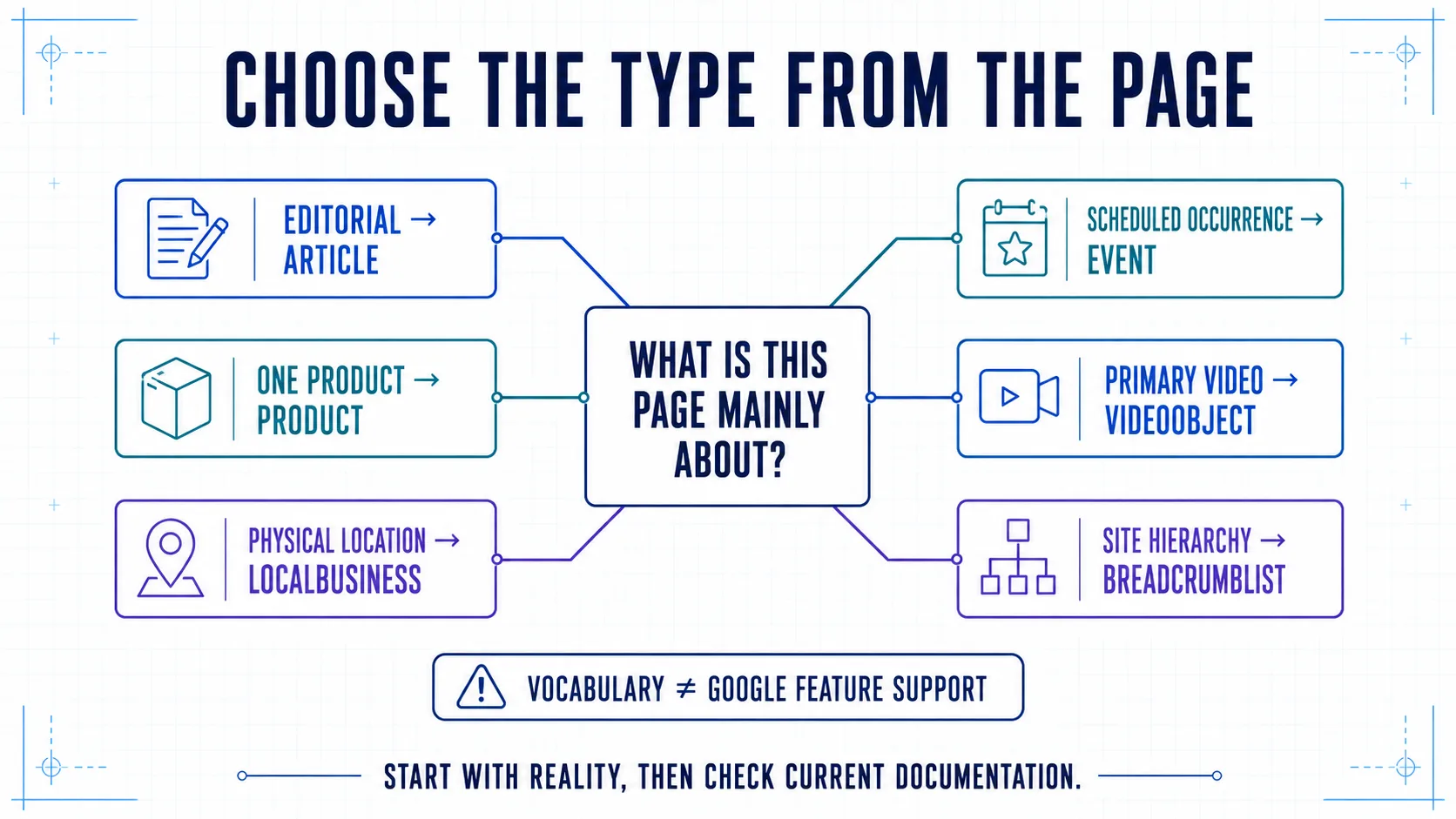
A practical 2026 type map
| Page purpose | Typical type | Check before shipping |
|---|---|---|
| Editorial story or guide | Article, BlogPosting, or NewsArticle | Current Article guidance, truthful dates and byline |
| One product or offer | Product plus Offer when present | Product snippets vs merchant listings, price and stock parity |
| Physical location | Specific LocalBusiness subtype | Real name, address, hours, phone, and applicable policy |
| Scheduled occurrence | Event | Actual date, location or online attendance details, and status |
| Page centered on a video | VideoObject | Crawlable thumbnail and an accessible video |
| Navigational hierarchy | BreadcrumbList | The user's actual path and canonical item URLs |
| Site or publisher identity | WebSite, Organization, Person | Stable identity data; do not expect a feature merely because the node validates |
Do not use an old tutorial as the support matrix. Google deprecated HowTo rich results in 2023 and stopped showing FAQ rich results in May 2026, as recorded in its Search documentation update log. HowTo and FAQPage can still exist in the Schema.org vocabulary, but that does not make them current Google rich-result tactics.
For Article markup, note another change that catches template checklists: Google's current Article documentation lists recommended properties rather than a universal set of required fields. Add every applicable, accurate recommendation that serves the page; do not invent a value to satisfy an outdated “required property” list.
Step 2: create a visible-fact contract
For every planned property, record the authoritative field, the visible location, transformation rule, and owner. This table becomes the contract between content, frontend, commerce, and SEO teams.
| JSON-LD property | Authoritative source | Visible surface | Transformation and test |
|---|---|---|---|
headline | CMS title | H1 | Exact editorial value; normalize whitespace only |
description | CMS summary | Intro or metadata | Do not manufacture a different claim |
datePublished | Immutable publish timestamp | Article dateline | ISO 8601 output |
dateModified | Material editorial update | Updated dateline | Do not change for every build |
author | Author directory ID | Byline/profile | Resolve to one stable @id |
image | Media asset record | Hero or article imagery | Absolute, crawlable URL and representative image |
mainEntityOfPage | Canonical route | Canonical page | Absolute canonical URL |
offers.price | Commerce record | Visible offer | Same value, currency, and current availability |
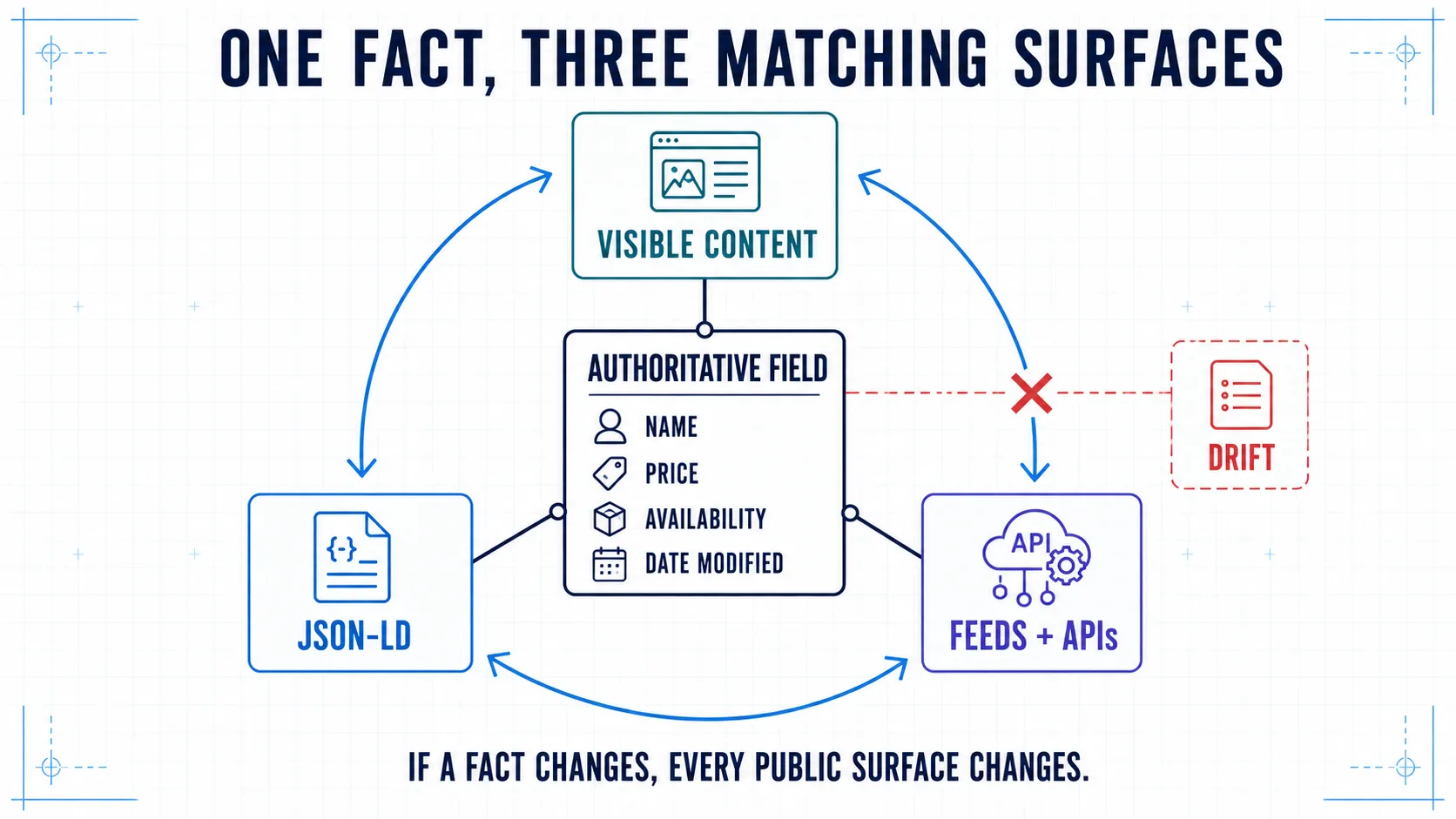
The rule is simple: one fact, one owner, several generated surfaces. Do not ask editors to type a price in the product component and again in an SEO plugin. Do not calculate dateModified from the deployment timestamp. Do not expose an aggregate rating unless genuine, accessible rating data and the relevant platform policy support it.
When a value is uncertain, omit it until its source is trustworthy. A smaller accurate graph is better than a comprehensive fiction.
Step 3: design stable entity IDs and relationships
An @id identifies a node so other nodes can reference the same entity instead of describing near-duplicates. Schema.org's data model documentation recommends URIs as identifiers; an absolute canonical URL with a fragment is practical:
https://example.com/#organizationhttps://example.com/people/alex#personhttps://example.com/insights/json-ld-guide#articlehttps://example.com/insights/json-ld-guide#webpage
The fragment does not need to resolve as a separate document. It should be stable, unique in your publishing system, and reused whenever the same entity appears. Changing #org to #organization across templates creates two identifiers for one publisher. Reusing one ID for two different people collapses distinct entities.
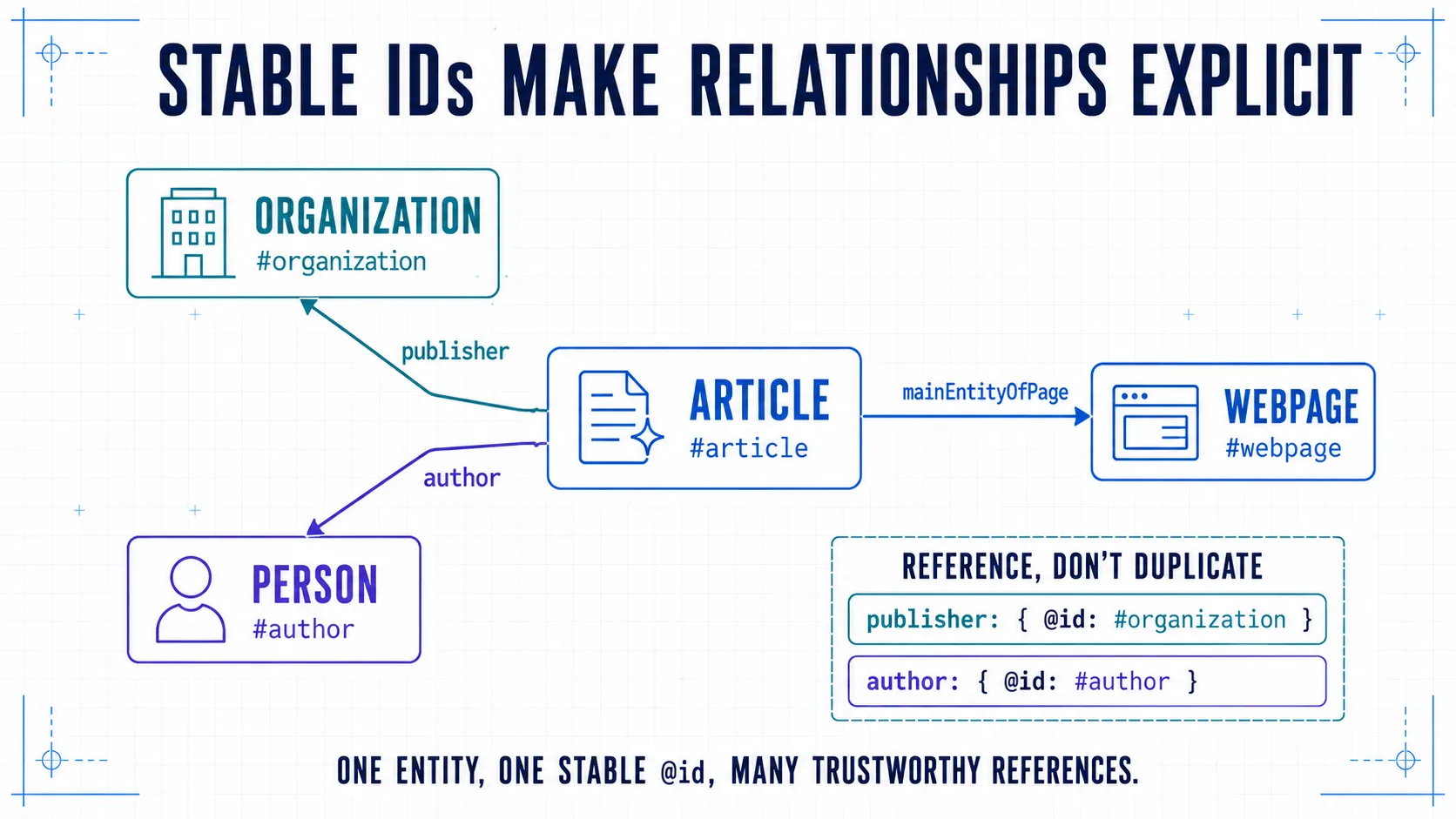
Use @graph when several top-level nodes need to be described together. It is an organizational tool, not a quality score. The useful question is not “How many nodes can we add?” but “Which entities and relationships are necessary to describe this page?”
Step 4: build the smallest accurate graph
This example connects a WebPage, BlogPosting, Person, and Organization. Replace every placeholder with values from the page's actual data contract.
<script type="application/ld+json">
{
  "@context": "https://schema.org",
  "@graph": [
    {
      "@type": "Organization",
      "@id": "https://example.com/#organization",
      "name": "Example Studio",
      "url": "https://example.com/",
      "logo": {
        "@type": "ImageObject",
        "url": "https://example.com/media/logo.png"
      }
    },
    {
      "@type": "Person",
      "@id": "https://example.com/people/alex#person",
      "name": "Alex Example",
      "url": "https://example.com/people/alex"
    },
    {
      "@type": "WebPage",
      "@id": "https://example.com/insights/json-ld-guide#webpage",
      "url": "https://example.com/insights/json-ld-guide",
      "name": "How to Implement Schema.org JSON-LD"
    },
    {
      "@type": "BlogPosting",
      "@id": "https://example.com/insights/json-ld-guide#article",
      "mainEntityOfPage": {
        "@id": "https://example.com/insights/json-ld-guide#webpage"
      },
      "headline": "How to Implement Schema.org JSON-LD",
      "description": "A production implementation guide.",
      "datePublished": "2026-08-18",
      "dateModified": "2026-09-07",
      "image": [
        "https://example.com/media/json-ld-guide-16x9.jpg",
        "https://example.com/media/json-ld-guide-4x3.jpg",
        "https://example.com/media/json-ld-guide-1x1.jpg"
      ],
      "author": {
        "@id": "https://example.com/people/alex#person"
      },
      "publisher": {
        "@id": "https://example.com/#organization"
      }
    }
  ]
}
</script>
Use absolute canonical URLs. Include properties that are applicable, current, and supported by your data. Google's Article guidance recommends representative, crawlable images and suggests multiple high-resolution aspect ratios—16:9, 4:3, and 1:1—when available. That is a publishing requirement, not a reason to point all three values at arbitrary crops.
For product data, decide whether the page is eligible for a product snippet, merchant listing, or both. Google's Product documentation explains that on-page structured data and Merchant Center feeds are complementary. Generate them from the same commerce records so price and availability do not disagree.
Step 5: serialize safely—valid JSON is not enough
Never assemble JSON-LD by concatenating strings. A JSON serializer handles quotation marks, newlines, and other JSON syntax correctly. But embedding serialized JSON in HTML adds a second boundary: the HTML parser.
Counterintuitive fact: a JavaScript object can serialize into perfectly valid JSON and still be unsafe to place raw inside an HTML script element. A content value containing </script> can terminate the element early. Validate the data and use your framework's approved safe-serialization pattern.
For static HTML, generate the serialized and HTML-safe string in trusted build code, not inside the template by hand. The JSON-LD 1.1 specification describes script embedding constraints.
In Next.js, the official JSON-LD guide shows a minimal pattern that escapes < as its Unicode sequence:
const jsonLd = {
  '@context': 'https://schema.org',
  '@type': 'BlogPosting',
  headline: post.title,
  datePublished: post.publishedAt,
  dateModified: post.updatedAt,
  author: {
    '@type': 'Person',
    name: post.author.name,
  },
};

const serializedJsonLd = JSON.stringify(jsonLd).replace(/</g, '\\u003c');

return (
  <script
    type="application/ld+json"
    dangerouslySetInnerHTML={{ __html: serializedJsonLd }}
  />
);
Use an organization-approved serializer or sanitizer when your security standard requires more. Treat CMS values as untrusted input even when only editors can enter them. Types such as schema-dts can catch shape errors during development, but TypeScript does not prove that a claim is visible, true, or eligible under Search policy.
Step 6: render it where crawlers and validators can receive it
JSON-LD may be placed in the head or body. In server-rendered or statically generated applications, emit it in the initial HTML whenever practical. Google can process structured data generated by JavaScript, but its JavaScript structured data guidance recommends testing the URL and warns that dynamically generated product markup can be less reliable for fast-changing values.
For React and headless stacks:
- create one typed builder per page family rather than copying objects between routes;
- generate visible content and JSON-LD from the same normalized record;
- omit empty optional properties instead of emitting
null,undefined, or empty arrays; - render one owned graph on the server or during prerendering;
- inspect the response HTML and the browser's rendered DOM;
- test client navigation if metadata can become stale between routes.
Tag managers can inject JSON-LD, but they create a second publishing path and often duplicate values already owned by the CMS. Reserve them for controlled cases with versioning and live-URL tests—not rapidly changing price, stock, date, or event status.
Step 7: validate four separate layers
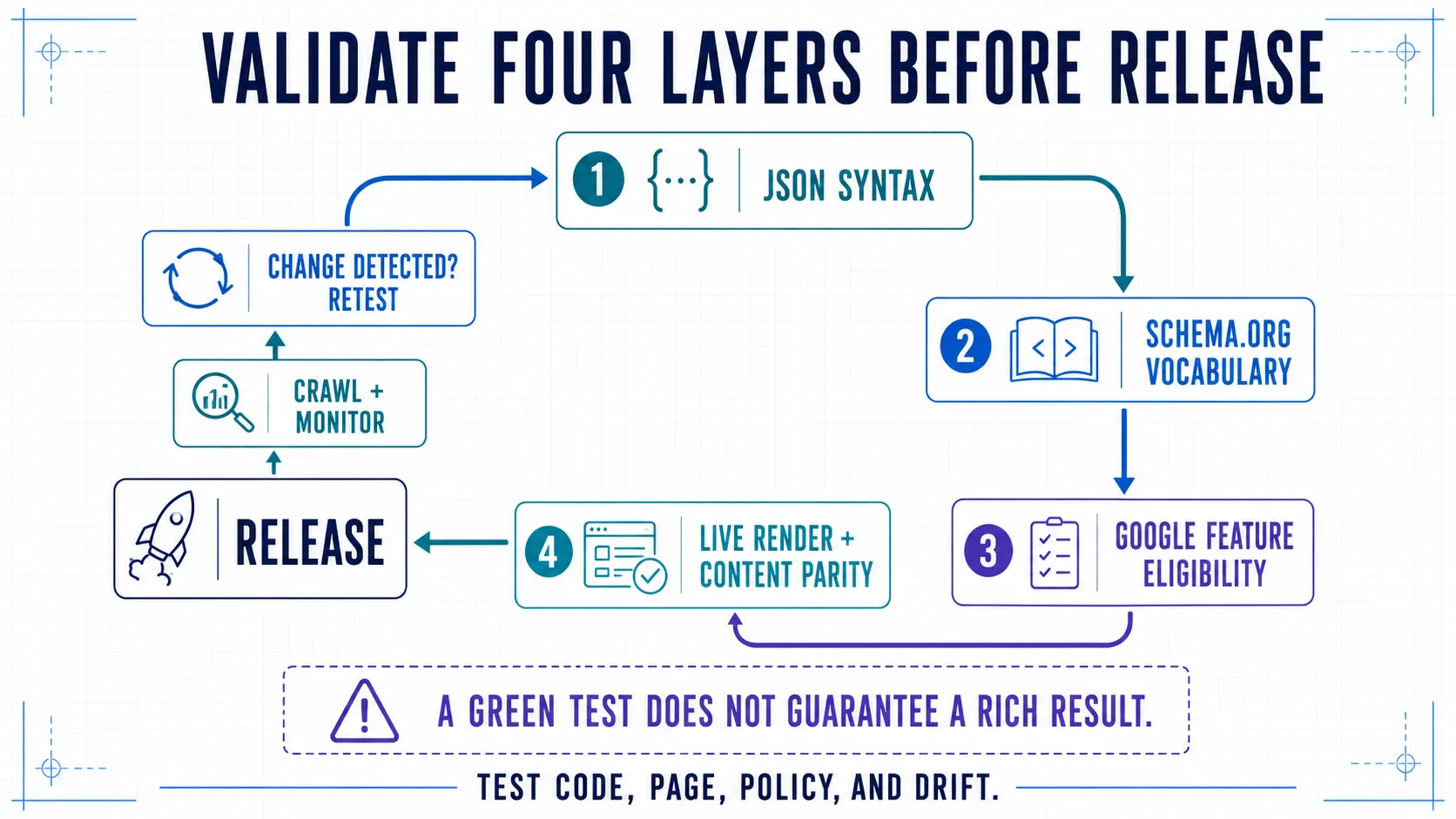
Layer 1: JSON syntax
Parse the exact serialized output. Fail the build on invalid JSON, duplicate object keys in hand-authored fixtures, non-absolute canonical URLs, malformed dates, or numbers emitted as localized strings.
Layer 2: Schema.org vocabulary
Use the Schema Markup Validator to inspect types and properties. It can identify vocabulary problems. It does not decide whether Google supports a feature or whether your page follows Google's policy.
Layer 3: Google feature eligibility
Use Google's Rich Results Test for a supported feature. Test a representative code sample during development and the deployed URL before sign-off. Read warnings rather than automatically suppressing them: some are useful recommended-property gaps, while others are genuinely inapplicable.
Layer 4: live rendering and content parity
Fetch the public URL as an anonymous user and inspect the delivered HTML and rendered DOM. Confirm:
- the expected JSON-LD block exists exactly once;
- each block parses independently;
- canonical URLs and
mainEntityOfPageagree; - headline, author, dates, price, stock, location, and other critical values match the page;
- robots rules, authentication, WAF, or consent logic do not hide the page or required assets;
- no plugin, theme, or tag manager emits a conflicting node.
A valid node may correctly yield no rich-result preview. A Rich Results Test pass may still yield no visible rich result. Eligibility is necessary for a supported feature, not a promise that the feature will display.
Step 8: add automated release checks
Unit-test builders with real edge cases: quotation marks, non-Latin names, missing optional images, authors with and without profile pages, discontinued offers, rescheduled events, and canonical route changes.
At minimum, assert:
- one primary article, product, event, or location node per canonical detail page;
- one stable ID for each reused publisher, author, product, or place;
- valid ISO dates and absolute public URLs;
- visible-value parity for price, currency, availability, title, author, and material update date;
- no fabricated ratings, reviews, or offers;
- safe serialization of
<, quotes, line separators, and content-like closing tags; - presence in server-rendered output;
- no duplicate nodes across plugins and custom templates.
Add a small route fixture for each page family to CI. Then crawl a representative production sample after release. Component tests cannot reveal a CDN rewrite, stale CMS cache, deployment race, or tag-manager duplicate.
Step 9: monitor drift, not just errors
Validators catch malformed or unsupported structures; they do not know when a once-correct value has become stale. Monitoring needs both machine checks and owner review.
Track:
- parse failures and missing JSON-LD blocks;
- new validator errors or warnings by template;
- mismatches between visible fields and structured data;
- duplicate or unstable IDs;
- Search Console enhancement trends for supported features;
- changes to Google feature documentation;
- releases that changed CMS fields, routing, pricing, authors, or metadata components.
Version the graph contract like an API. A field rename, currency change, author migration, or URL redesign should identify affected types, fixtures, owners, rollout order, and rollback path. Revalidate after the change—not only when Search Console eventually reports a problem.
Implementation artifact: Download the JSON-LD Production Fieldbook (Markdown). It includes a page inventory, feature-support check, source-field contract, @id registry, graph plan, serialization controls, validation matrix, CI gates, release record, and 30/60/90-day drift review.
Stack-specific implementation notes
Plain HTML or static-site generator
Create JSON objects in build code, serialize once, and place the safe output in the page template. Reuse site-level organization and website definitions by ID. Avoid manually maintaining hundreds of page-specific snippets.
WordPress or another CMS
Inventory theme and plugin output before adding custom markup. Decide whether the SEO plugin or your application owns Organization, Article, Breadcrumb, and Product nodes. Map custom fields into one graph and crawl the final page for duplicates after every plugin or theme update.
Shopify or another ecommerce platform
Generate Product and Offer values from the same catalog record used for the visible page and feeds. Test variants, sale prices, currency markets, out-of-stock states, bundles, and subscription offers separately. Do not let an app and theme publish competing Product nodes.
Next.js, React, or a headless architecture
Keep schema builders beside normalized domain models rather than UI components. Server-render or prerender the final block, use typed fixtures, escape serialized output safely, and test page transitions. See our headless React vs monolithic CMS guide for the wider ownership trade-offs.
Common implementation failures
Copying a generic template unchanged
Placeholders, inappropriate types, and nonexistent properties survive because the sample “looked complete.” Start from the data contract, not from template size.
Marking up hidden or unrelated information
Structured data should describe the visible main content. Do not hide reviews, offers, questions, or events solely in JSON-LD.
Treating a vocabulary validator as a Search guarantee
Schema.org validity, Google feature eligibility, rendering, policy compliance, and actual display are five different questions.
Generating multiple versions of one entity
A plugin says #organization, a theme says #publisher, and a custom component creates an inline Organization with no ID. Consolidate ownership and reference one stable node.
Updating the page without updating JSON-LD
Stale prices, dates, event status, author data, and availability are data-pipeline failures. Generate both surfaces from one source and monitor their parity.
Assuming schema is an AI-citation switch
Accurate entity relationships can reduce ambiguity and support eligible Search features, but no official source promises that JSON-LD earns an AI citation. Crawlability, indexing, useful source content, evidence, reputation, and query relevance remain separate. That distinction also anchors our evidence-based GEO strategy guide and AI visibility measurement framework.
Production checklist
- [ ] The page purpose and main entity are written down.
- [ ] The type matches the actual page and current documentation.
- [ ] Every critical property has an authoritative source and visible location.
- [ ] IDs are absolute, stable, unique, and reused for the same entity.
- [ ] The graph contains only necessary, truthful relationships.
- [ ] Output is serialized and embedded safely.
- [ ] The script appears in server-rendered or reliably rendered public HTML.
- [ ] JSON syntax and Schema.org vocabulary validation pass.
- [ ] The relevant Google feature test passes without unresolved applicable issues.
- [ ] Live values match visible content and no duplicate nodes conflict.
- [ ] CI covers builders, edge cases, routes, and serialization.
- [ ] A named owner monitors drift and documentation changes.
The bottom line
The best JSON-LD implementation is not the largest graph or the one with the most green badges. It is the smallest accurate model that derives from maintained source fields, uses stable identity, survives the HTML boundary safely, appears in the live page, and changes when the underlying facts change.
Build that system once for each page family and JSON-LD becomes reliable publishing infrastructure. Paste isolated snippets into templates and it becomes technical debt with curly braces.