

Do Core Web Vitals determine AI search visibility?
No. There is no documented Core Web Vitals score that makes a page “AI-search compatible,” and passing LCP, INP, and CLS does not guarantee retrieval, ranking, mention, or citation.
Google says its generative AI features use the core Search index, ranking systems, and quality systems. A page must be indexed and eligible to appear with a snippet, but even complete technical compliance does not guarantee inclusion. Google recommends good page experience—including low latency—because it helps the people who visit the page, not because a Lighthouse score unlocks AI Overviews or AI Mode.
Core Web Vitals still deserve serious engineering attention. They measure whether the largest visible content arrives promptly, interactions receive timely visual feedback, and the layout remains stable. Performance work can also expose delivery problems such as slow server responses, JavaScript-dependent content, oversized media, unstable embeds, and excessive third-party code.
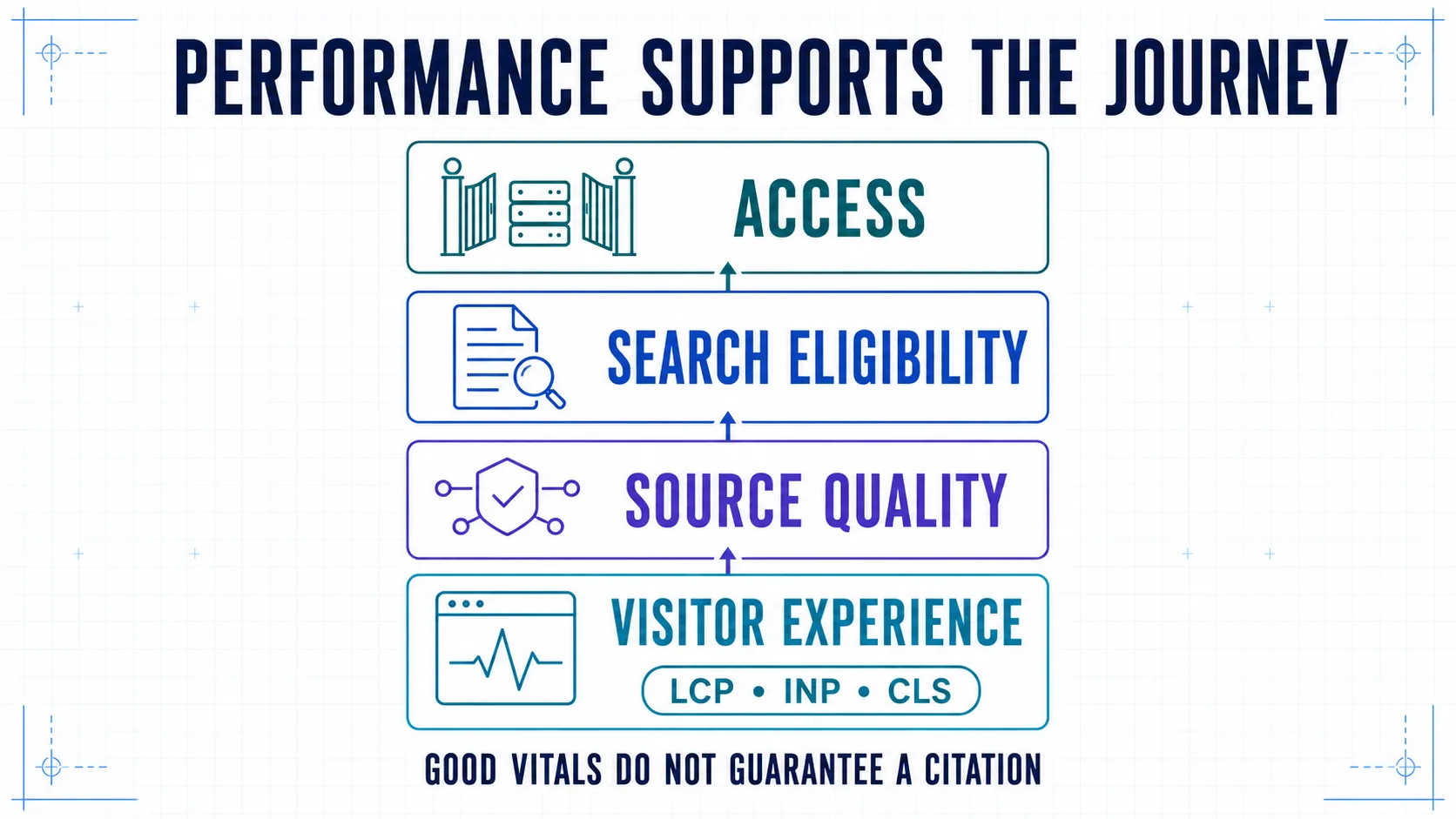
Treat AI search compatibility as four connected layers:
- Access: the intended crawler can request a canonical URL and receive a healthy response.
- Search eligibility: the page can be rendered, indexed, and shown with a snippet where the platform requires it.
- Source quality: the content is accurate, useful, distinctive, and supported by evidence.
- Visitor experience: cited or referred users can read, interact, and convert without delay or layout disruption.
Core Web Vitals primarily evaluate layer four. Some fixes also strengthen the delivery architecture beneath layers one and two, but performance cannot replace either eligibility or source quality.
Current Core Web Vitals thresholds
Google evaluates Core Web Vitals at the 75th percentile of page visits, separately for mobile and desktop. The official Core Web Vitals documentation defines these ranges:
| Metric | What it measures | Good | Needs improvement | Poor |
|---|---|---|---|---|
| LCP | Loading of the largest visible image, text block, or video element | ≤ 2.5 s | > 2.5–4.0 s | > 4.0 s |
| INP | Responsiveness across qualifying interactions during a visit | ≤ 200 ms | > 200–500 ms | > 500 ms |
| CLS | Unexpected visual movement across the page lifecycle | ≤ 0.1 | > 0.1–0.25 | > 0.25 |
These are user-experience thresholds, not AI-crawler service-level agreements. Do not re-label them as “AI citation requirements,” “LLM crawl limits,” or proof that a system can extract a page.
Begin with field data, not a perfect Lighthouse score
Core Web Vitals are field metrics. The most useful baseline combines three kinds of evidence:
| Evidence | Best use | Important limitation |
|---|---|---|
| Search Console Core Web Vitals report | Find poor URL groups and device-wide patterns | Groups similar URLs; not every URL has enough data |
| CrUX or PageSpeed Insights field data | Check a page or origin against aggregated Chrome-user experience | Uses a rolling 28-day window and may lack page-level data |
| First-party real-user monitoring (RUM) | Attribute problems to templates, elements, interactions, releases, markets, and devices | Requires deliberate instrumentation and privacy review |
| Lighthouse and DevTools | Reproduce and diagnose likely causes under controlled conditions | A lab run is a synthetic observation, not the field distribution |
Search Console uses Chrome UX Report data and groups URLs with similar experiences. Its status is determined by the worst-performing Core Web Vital in the group. A page can therefore look fast in one local test while its group remains poor for real mobile users.
The 28-day reality check: CrUX-based tools use a rolling 28-day window. A production fix can improve first-party RUM immediately while the public field aggregate changes gradually. “Search Console is still red tomorrow” is not evidence that the release failed.
Build a usable baseline
For each priority template, record:
- representative URLs and business importance;
- mobile and desktop p75 values;
- sample coverage and whether the value is page-, group-, or origin-level;
- the current LCP element;
- the slow INP interaction and its target where known;
- the largest CLS cluster and likely source;
- release version, market, device class, and collection window;
- search, AI-referral, engagement, and conversion metrics as separate outcomes.
Do not average a fast homepage with a slow product catalog. Segment by template and the customer journey it supports.
The field-to-fix workflow
Use one repeatable sequence for all three metrics:
- Measure: find a real field problem at p75.
- Attribute: identify the affected template, device, element, interaction, or component.
- Reproduce: create a lab trace that exhibits the same cause.
- Fix: change the smallest shared cause that can improve the affected population.
- Release: ship with rollback criteria and instrumentation intact.
- Validate: watch immediate RUM, regressions, and business outcomes; then allow the 28-day aggregate to mature.
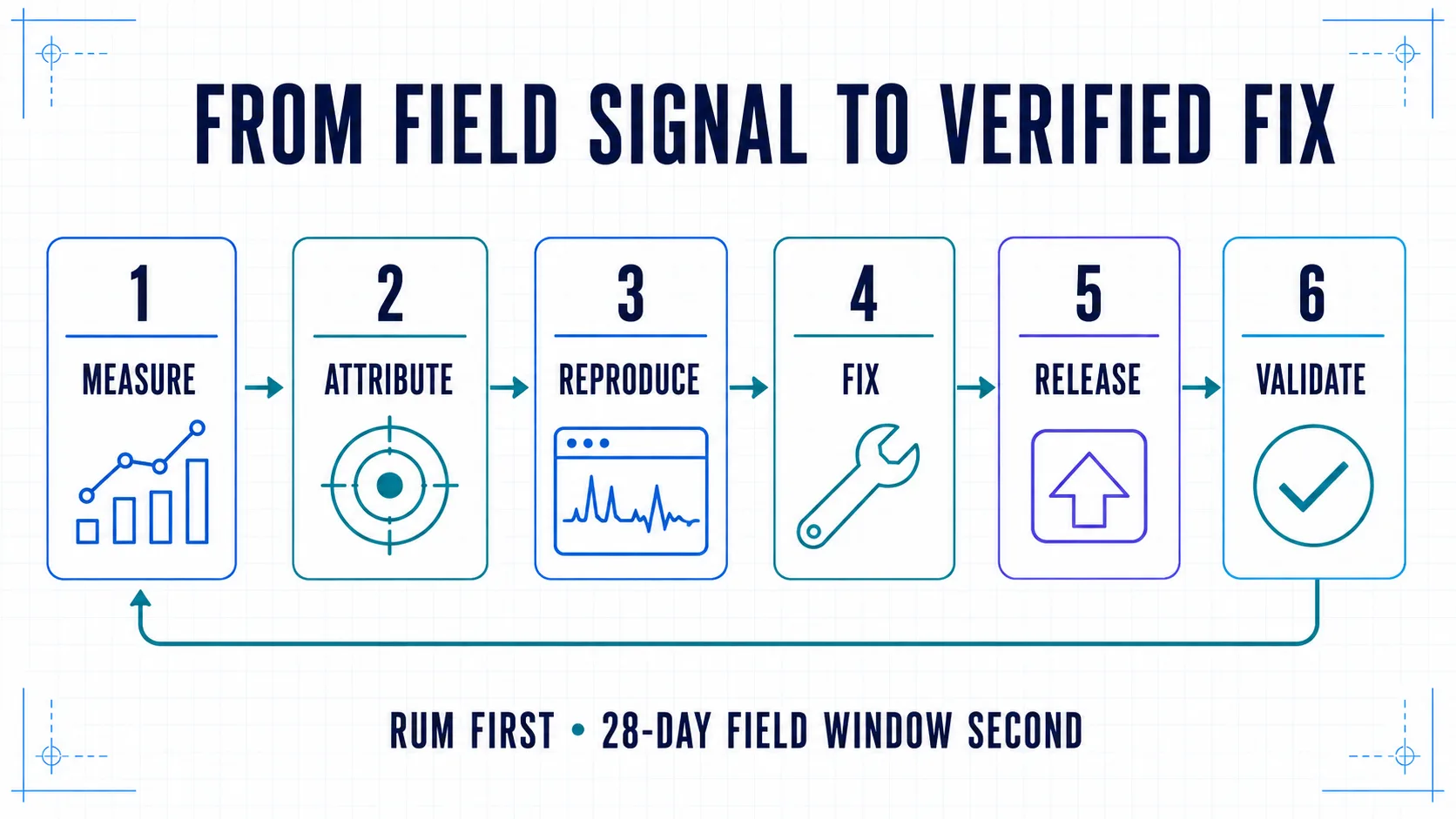
This workflow prevents two common mistakes: optimizing whatever Lighthouse highlights first, and declaring success from a single after screenshot.
How to optimize LCP
Largest Contentful Paint measures when the largest image, text block, or video element visible in the viewport is rendered. It includes navigation and connection time that may not appear in a simplified server chart.
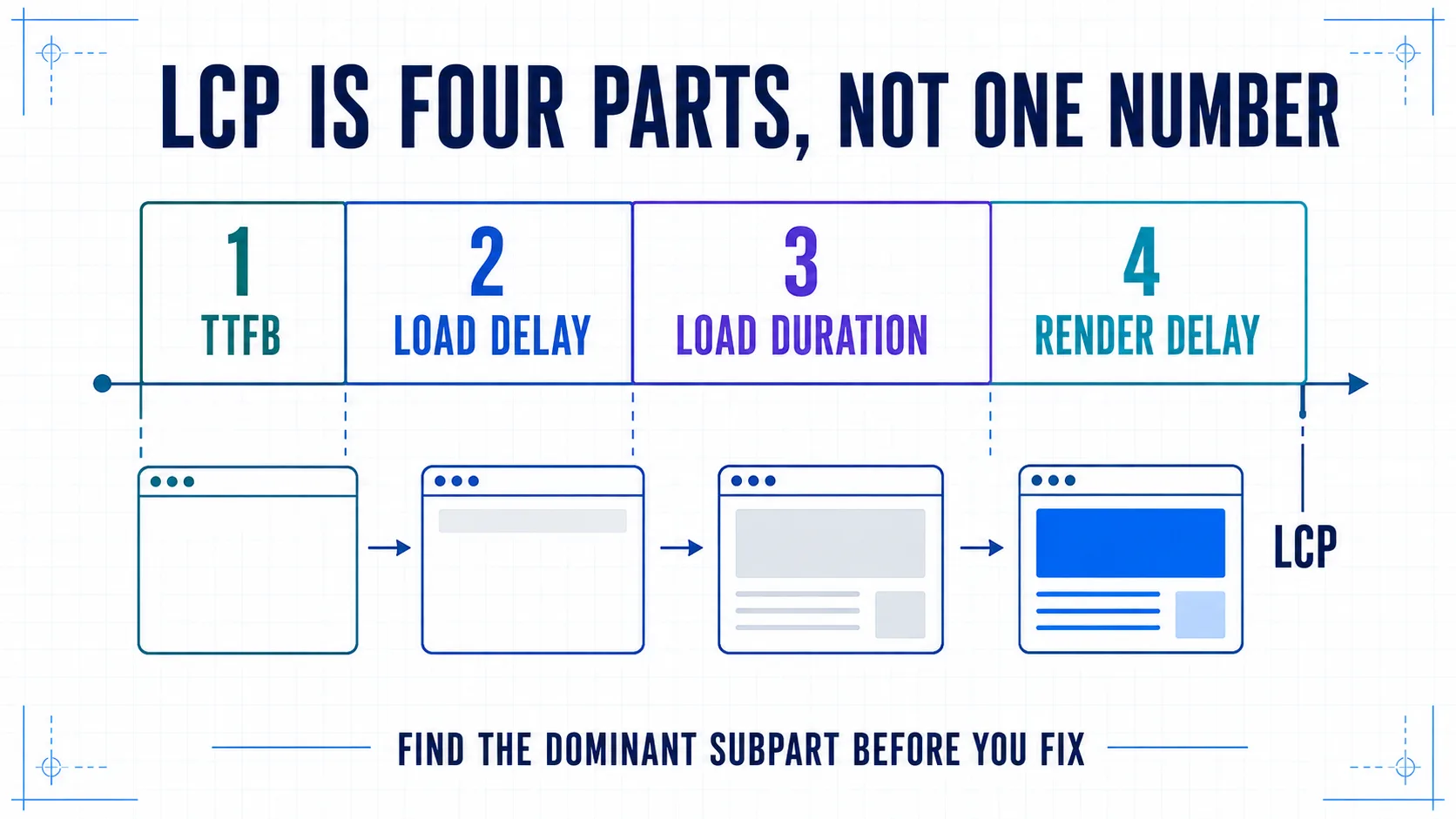
Break LCP into four subparts before choosing a fix:
- Time to First Byte (TTFB): navigation start until the first byte of the HTML response.
- Resource load delay: first byte until the browser starts requesting the LCP resource.
- Resource load duration: time spent downloading that resource.
- Element render delay: resource completion until the element is painted.
Fix the dominant LCP subpart
| Dominant subpart | Typical evidence | High-value interventions |
|---|---|---|
| TTFB | Slow HTML request, redirects, uncached server work, distant origin | Remove redirect chains, cache safe responses, reduce backend waterfalls, move delivery closer to users |
| Resource load delay | Hero discovered in CSS or JavaScript, lazy-loaded LCP image, late API response | Put the resource in initial HTML, avoid lazy-loading it, use fetchpriority="high" or preload only when evidence supports it |
| Resource load duration | Oversized image, wrong responsive candidate, slow asset host | Use correctly sized srcset, efficient formats, compression, CDN caching, and connection reuse |
| Element render delay | Render-blocking CSS, font dependency, hydration gate, hidden content | Reduce critical CSS and synchronous JavaScript, render meaningful HTML immediately, and remove presentation gates |
Start with the actual LCP element on each template and device. A desktop heading may become a mobile hero image; a personalized banner may become the field LCP only after consent or authentication.
LCP implementation checklist
- [ ] The LCP element is identified from field or production-like evidence.
- [ ] The element and critical resource are discoverable in initial HTML.
- [ ] The above-the-fold image is not lazy-loaded.
- [ ] Responsive image candidates match real display sizes and device densities.
- [ ] Width and height or an aspect ratio are declared.
- [ ] Preloads are limited to resources that are genuinely critical.
- [ ] Server and API dependencies have explicit latency budgets.
- [ ] Fonts do not unnecessarily delay the largest text block.
- [ ] Client rendering does not postpone content already known at request time.
Compressing an image may not improve LCP if the saved time simply becomes render delay. Re-measure the four subparts after every change.
How to optimize INP
Interaction to Next Paint evaluates responsiveness across qualifying interactions throughout a visit. A slow menu, filter, form, carousel, configurator, or checkout control can become the page's INP even when initial loading looks fast.
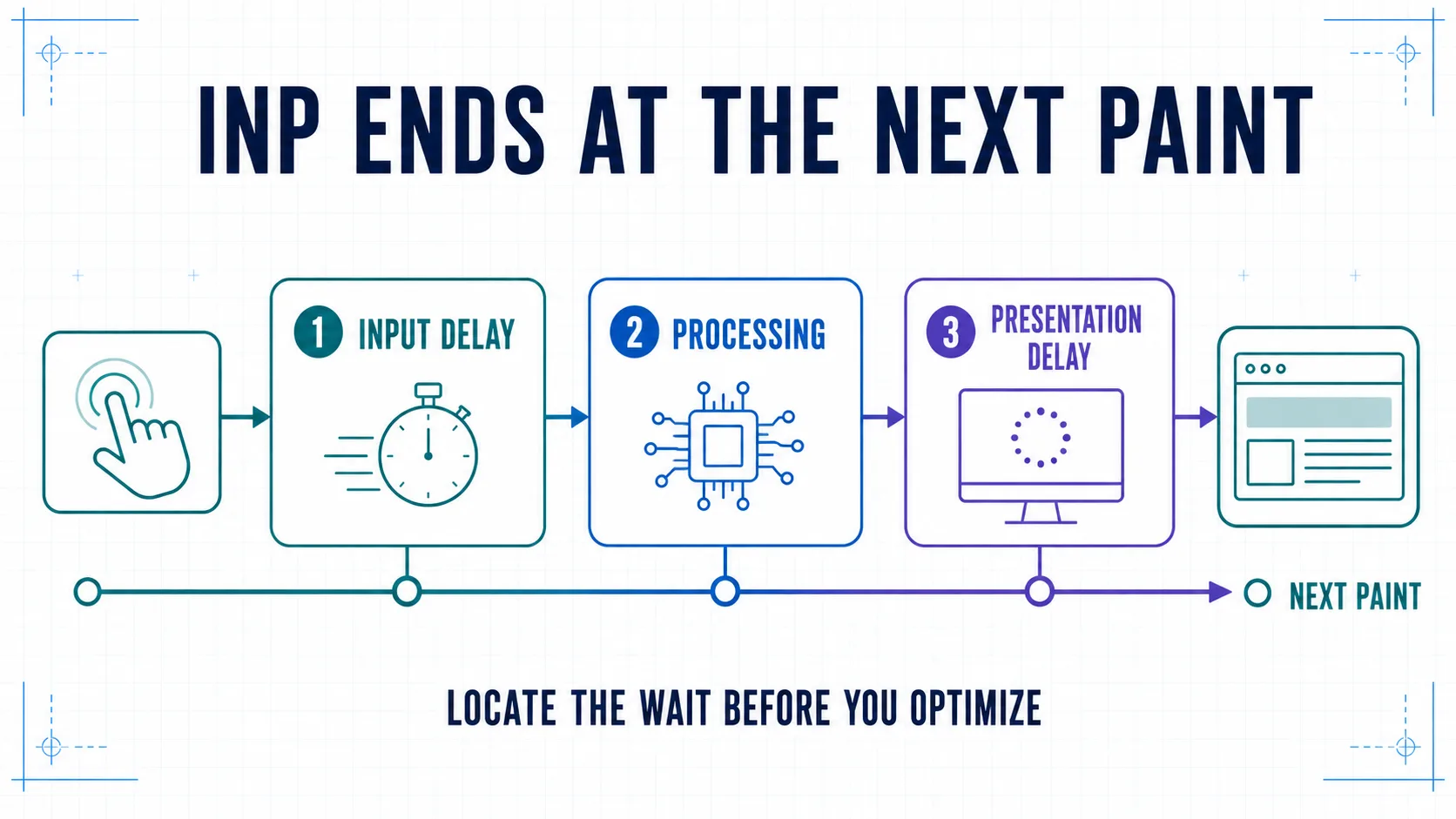
Every measured interaction has three subparts:
- Input delay: the user acts, but the main thread is busy before event processing begins.
- Processing duration: event callbacks run.
- Presentation delay: callbacks finish, but the browser still needs to render and paint the next frame.
Diagnose the interaction, not only the JavaScript bundle
Instrument field INP with the target element, interaction type, route, and subpart timings where your privacy policy permits it. Then reproduce that interaction on a representative device.
| Slow subpart | Common causes | Practical fixes |
|---|---|---|
| Input delay | Long startup tasks, third-party execution, overlapping work | Remove unnecessary scripts, split long tasks, delay non-critical third parties, reduce hydration work |
| Processing | Expensive handlers, repeated state updates, synchronous parsing | Do less work in the callback, batch updates, cache repeated computation, delegate events where appropriate |
| Presentation | Large DOM updates, layout thrashing, complex rendering | Reduce affected DOM, avoid forced synchronous layout, render immediate feedback before secondary work |
Use Lighthouse Total Blocking Time as a lab diagnostic for main-thread pressure, not as a replacement for field INP. INP depends on when real users interact and what they interact with; a load-only lab audit cannot reproduce that distribution.
INP implementation checklist
- [ ] RUM identifies the slow interaction and target instead of reporting only one page value.
- [ ] Startup work is tested while a user tries to interact.
- [ ] Tasks longer than 50 ms are inspected and split where practical.
- [ ] Immediate visual feedback is prioritized before secondary work.
- [ ] Third-party tags have owners, loading rules, and a main-thread budget.
- [ ] Non-interactive components are not hydrated without a reason.
- [ ] Large client-rendered lists and DOM updates are bounded.
- [ ] Navigation, consent, search, forms, and conversion controls are included in testing.
How to optimize CLS
Cumulative Layout Shift measures unexpected visual instability. It is unitless: the score reflects how much visible content moved and how far it moved.
The usual sources are not mysterious:
- images or video without dimensions;
- ads, embeds, and iframes without reserved space;
- consent banners, alerts, recommendations, or personalization inserted above existing content;
- font swaps with mismatched fallback metrics;
- server markup that changes shape during hydration;
- animations that modify layout properties;
- components that collapse, expand, or reorder after late data arrives.
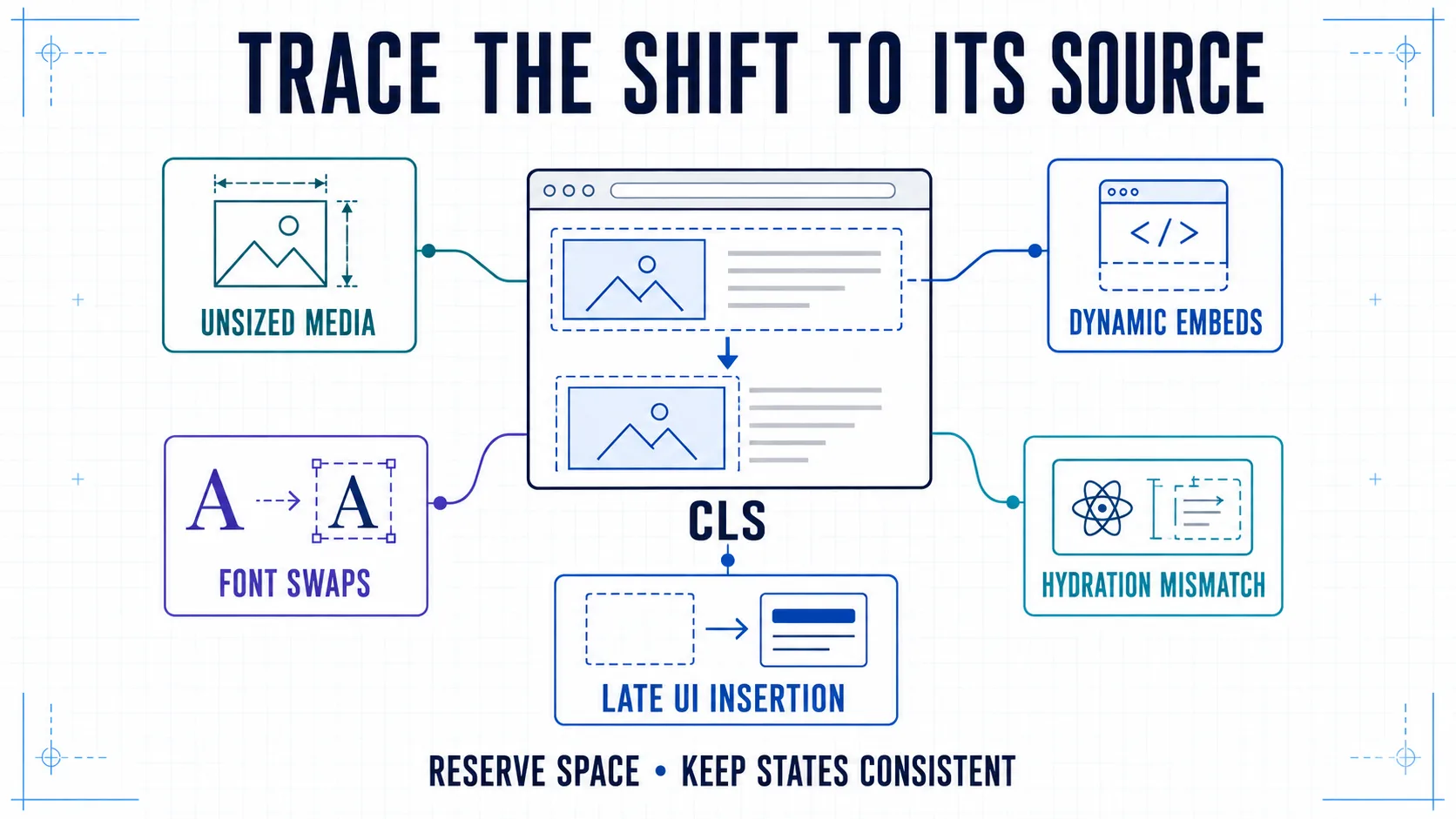
Stabilize the layout at the component boundary
- Declare intrinsic dimensions or
aspect-ratiofor media. - Reserve a predictable slot for embeds, ads, consent, and asynchronous modules.
- Prefer overlays or user-triggered insertion when content cannot reserve space.
- Match fallback font metrics and test real headlines, languages, and weights.
- Keep server and hydrated markup structurally consistent.
- Animate
transformandopacityinstead of properties such astop,left, width, or height. - Capture field attribution because post-load shifts may not appear in a short Lighthouse run.
A stable article protects reading context after an AI referral. A stable product page protects intent: the button a customer chooses should not move under their pointer.
Architecture patterns that improve performance without creating a bot-only page
The strongest patterns serve one accurate source to people and crawlers:
- SSR, static generation, or reliable prerendering for public content;
- semantic HTML containing the primary answer before optional widgets initialize;
- progressive enhancement for menus, filters, calculators, and forms;
- route-level code splitting and deliberate hydration boundaries;
- cacheable content APIs with bounded dependency chains;
- edge caching with correctness, invalidation, and stale-content rules;
- image transformation close to the requesting user;
- stable canonical URLs and predictable redirect behavior;
- explicit budgets for JavaScript, fonts, third parties, and above-the-fold media;
- monitoring by template, device, market, and release.
Do not serve a stripped “AI version” that differs materially from the human page. Performance optimization should simplify and stabilize the shared delivery path.
What to verify specifically for AI search compatibility
Performance testing and AI-search testing answer different questions. Run both.
Delivery and search eligibility
- [ ] Canonical priority URLs return
200without redirect or authentication surprises. - [ ] Main content and links are present in server output or reliably rendered.
- [ ]
robots.txt, meta robots, and snippet controls express the intended policy. - [ ] CDN, WAF, and bot-management rules do not contradict that policy.
- [ ] Google sees the intended indexed canonical.
- [ ] Structured data matches visible content and validates where applicable.
Page experience
- [ ] Mobile and desktop field values are reviewed separately.
- [ ] Deep article, product, comparison, and conversion routes are represented.
- [ ] AI-referral landing pages are segmented in analytics.
- [ ] Engagement and conversion are compared before and after the release.
- [ ] Core Web Vitals and AI visibility remain separate metrics.
OpenAI's crawler documentation describes OAI-SearchBot controls for ChatGPT Search, while Perplexity documents PerplexityBot and its infrastructure verification. Neither publishes LCP, INP, or CLS thresholds for citation. Test HTTP delivery and logged crawler outcomes directly instead of treating a browser performance score as a crawler-access test.
Set engineering budgets below the public thresholds
The “good” boundary is a pass/fail experience classification, not an ideal internal target. Give teams headroom for device variance, third-party changes, personalization, and seasonal traffic.
For each template, define:
| Budget field | Example format |
|---|---|
| Population | Mobile product detail visits in AT and DE |
| Field target | p75 LCP ≤ internal target |
| Guardrail | No regression in INP or CLS |
| Lab reproduction | Named device, network, route, and interaction script |
| Owner | Platform, frontend, growth, content, or vendor |
| Rollback rule | Threshold and observation period that stops release |
| Validation | RUM first; CrUX/Search Console after the rolling window matures |
The internal number should come from your baseline, risk tolerance, and available headroom. Do not present a self-selected budget as a Google or AI-platform requirement.
Implementation artifact: Download the Core Web Vitals Release Workbook (Markdown) to record field baselines, LCP/INP/CLS attribution, lab reproduction, release budgets, owners, rollback rules, and post-release validation.
Prioritize work by reach and consequence
Fix performance issues in this order:
- Missing, blocked, or failed primary content.
- Poor field performance on revenue-critical templates.
- Shared causes affecting many routes, such as a layout shell, tag manager, image component, or API.
- Mobile interaction and conversion blockers.
- Regressions introduced by a known release.
- Template-specific improvements with measurable user impact.
- Cosmetic lab-score work with no demonstrated field or business effect.
Prioritization should include affected visits, business importance, severity, engineering control, and confidence in the diagnosed cause.
A release-ready Core Web Vitals checklist
- [ ] Field LCP, INP, and CLS are measured at p75 for mobile and desktop.
- [ ] Page-, group-, and origin-level data are labelled correctly.
- [ ] Priority templates and conversion paths have first-party RUM.
- [ ] The LCP element and dominant subpart are identified.
- [ ] Slow INP interactions are attributed to a target and subpart.
- [ ] CLS clusters are attributed to owning components.
- [ ] The lab trace reproduces the field cause rather than an unrelated warning.
- [ ] The release has an owner, guardrails, and a rollback rule.
- [ ] Server output preserves primary content and links.
- [ ] Mobile, localized, personalized, and consent states are tested.
- [ ] Immediate RUM and 28-day public field validation are both planned.
- [ ] Search visibility, AI mentions or citations, referrals, and conversions are reported separately.
- [ ] No claim promises AI visibility from performance scores.
Bottom line
Optimize Core Web Vitals because fast, responsive, stable pages serve people better and because the investigation often improves the architecture delivering your content. For AI search, preserve the distinction between access, eligibility, source quality, and visitor experience. Measure each layer with evidence appropriate to that layer.
Our Core Web Vitals and performance engineering service covers field diagnosis, implementation, and release validation. For the wider eligibility layer, use the technical SEO guide for AI search and the GEO audit checklist.
Primary sources
- Google Search Central: Core Web Vitals and Search
- Google Search Central: Optimizing for generative AI features
- Search Console Help: Core Web Vitals report
- Chrome for Developers: CrUX tools and reporting windows
- web.dev: Optimize Largest Contentful Paint
- web.dev: Optimize Interaction to Next Paint
- web.dev: Optimize Cumulative Layout Shift
- web.dev: Why lab and field data can differ
- OpenAI: Overview of OpenAI crawlers
- Perplexity: Crawler documentation