

What is the difference between headless React and a monolithic CMS?
A headless React architecture separates the frontend application from the content-management and backend systems. React or a React framework renders data delivered through APIs. A monolithic CMS keeps content, templates, plugins, rendering, preview, and administration in one integrated platform.
Headless React offers more control over user experience, rendering, integrations, and multi-channel delivery. A monolithic CMS usually offers faster setup, a cohesive editorial experience, fewer moving parts, and lower initial engineering overhead. Neither architecture is inherently faster, safer, or better for SEO.
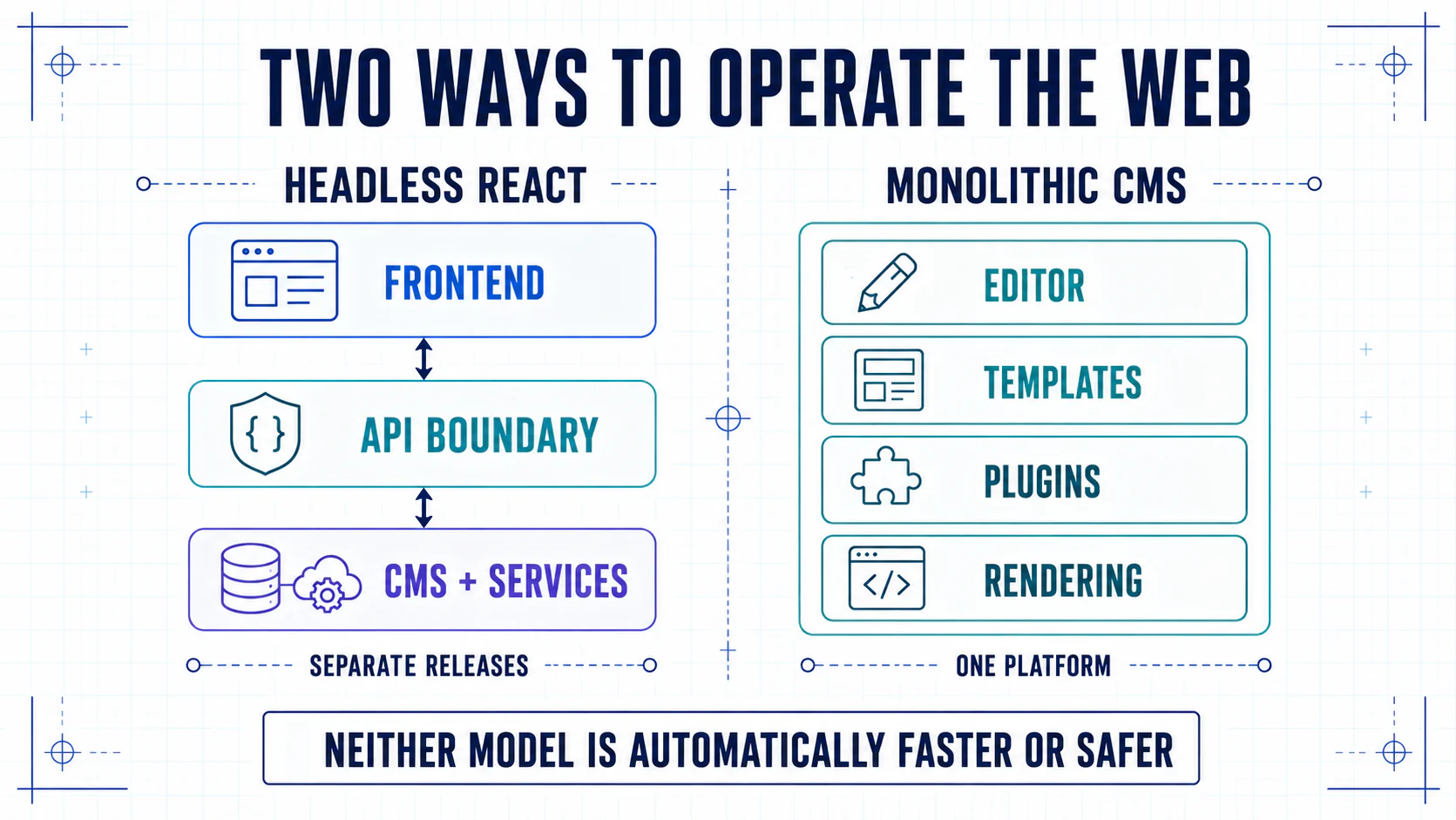
Bottom line: choose headless only when separating the frontend creates business value that is worth operating. Choose a monolith when an integrated platform already meets the journey, workflow, and governance requirements. Prototype a hybrid when the value is concentrated in only part of the site.
Review method: We checked the comparison against first-party React, Google, Next.js, WordPress, and OWASP documentation on September 5, 2026. The recommendations below are editorial judgments, not a comparative production benchmark or a guaranteed performance result.
Comparison at a glance
| Criterion | Headless React | Monolithic CMS |
|---|---|---|
| Frontend control | High | Bound by themes and platform APIs |
| Editorial setup | Must be designed and integrated | Usually available out of the box |
| Multi-channel reuse | Native to structured content | Possible, often limited or plugin-led |
| Rendering choices | Static, SSR, streaming, edge, client | Platform-defined with extensions |
| Initial launch | More architecture work | Usually faster |
| Integration model | API-first and composable | Plugin/module-first |
| Operational ownership | Distributed across services | Concentrated in one platform |
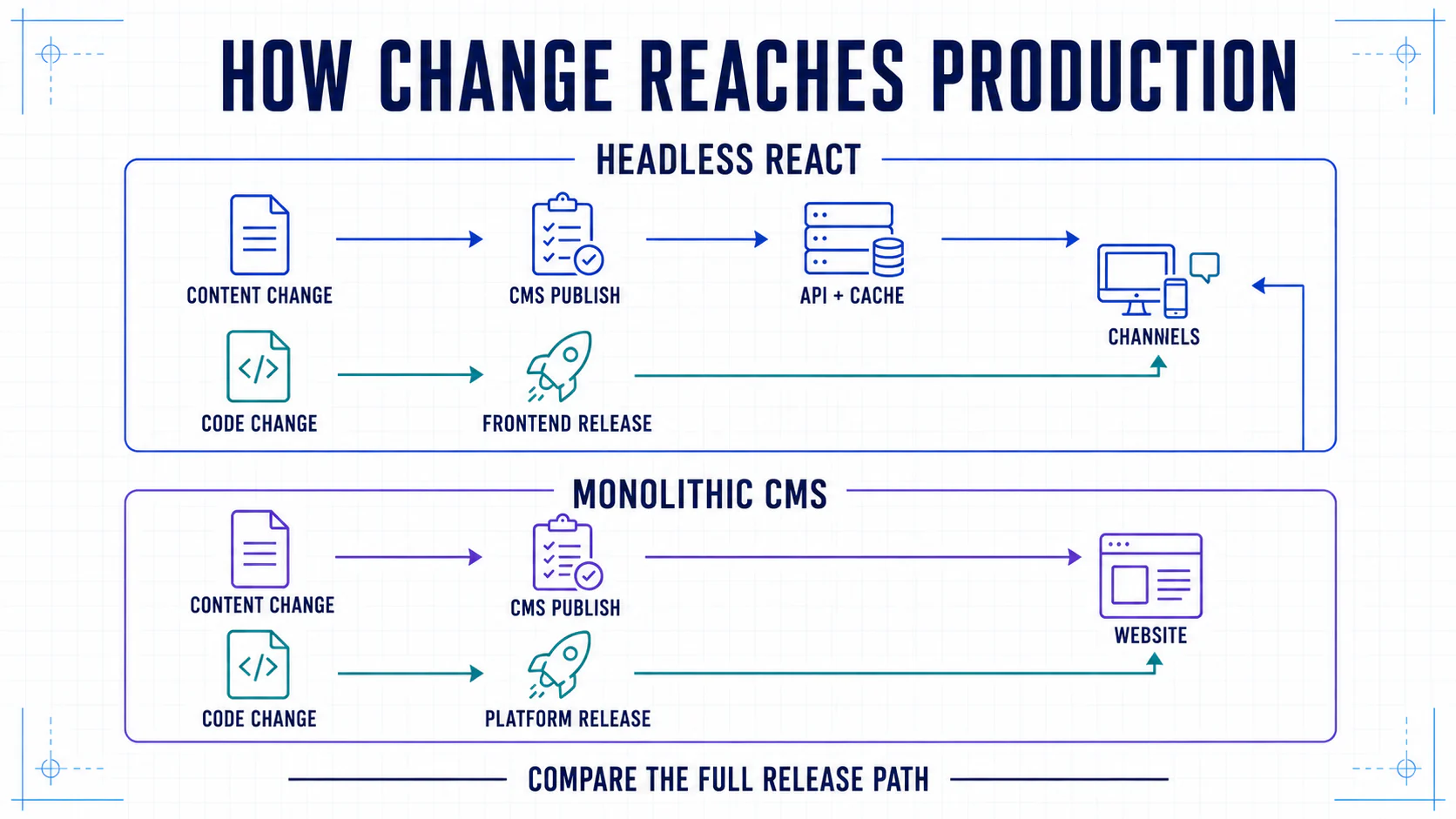
| Content-change path | CMS publish, API/cache propagation, channel delivery | CMS publish and platform delivery |
| Migration flexibility | Components can move in stages | Often larger platform releases |
| Cost profile | Higher engineering, flexible vendors | License/plugins plus platform constraints |
The labels describe boundaries, not every implementation detail. A monolithic CMS can expose APIs—WordPress, for example, documents a REST API—and a headless React frontend can send complete HTML from the server. “Headless” does not mean “client-only,” and “monolith” does not mean “no integrations.”
Where headless React is stronger
Bespoke product experience
React teams can build interaction patterns and design systems without fitting them into a theme layer. This matters for complex configurators, account journeys, multi-step conversion flows, and shared components across web applications.
Rendering control
Public routes can use static generation, server rendering, streaming, or edge caching, while authenticated areas use a different approach. React's server APIs can render components to HTML and support streaming. Those are framework capabilities, not an automatic application architecture.
Teams must still implement status codes, metadata, canonicals, caching, failure handling, and content-complete server output correctly.
Reuse across channels and markets
A structured CMS record can feed several sites, apps, regions, or partner experiences. Product and organization facts can remain centralized while each market controls local offers and proof.
Independent delivery teams
Frontend, content platform, and backend services can release on separate cycles through versioned contracts. This is valuable for larger organizations, but it requires governance so “independent” teams do not create incompatible APIs and duplicated data.
Where a monolithic CMS is stronger
Immediate editorial workflow
Page creation, media, preview, permissions, scheduling, templates, and publishing are usually integrated. A small marketing team can launch without first building a preview layer or orchestration service. WordPress illustrates the category: its current documentation describes editorial roles and capabilities and restorable revisions inside the platform.
Fewer operational boundaries
There are fewer APIs, webhooks, deployment targets, tokens, and cache layers. Backups, updates, and incident diagnosis may be simpler when one platform owns most of the request path.
Mature extensions for common sites
Brochure sites, blogs, simple catalogs, and lead-generation pages often fit established templates and plugins. Custom engineering adds little value if the requirement is already solved reliably by the platform.
Lower initial engineering demand
The integrated platform can be less expensive to launch and maintain when traffic, channels, locales, and workflows are modest. This advantage can reverse if extensive plugin customization creates upgrade and performance debt.
SEO and AI-search implications
Both architectures can support strong search performance. Both can also fail.
Headless React needs explicit implementation of:
- server-rendered or reliably prerendered main content;
- accurate HTTP statuses and redirects;
- title, description, canonical, robots, and social metadata;
- crawlable links and pagination;
- XML sitemaps and localized alternates;
- structured data that matches visible content;
- controlled JavaScript and API waterfalls.
A monolithic CMS needs control over:
- plugin-generated duplicate metadata and schema;
- slow themes, database queries, and third-party scripts;
- canonical and archive behavior;
- URL and redirect changes during upgrades;
- content models that do more than assemble page blobs.
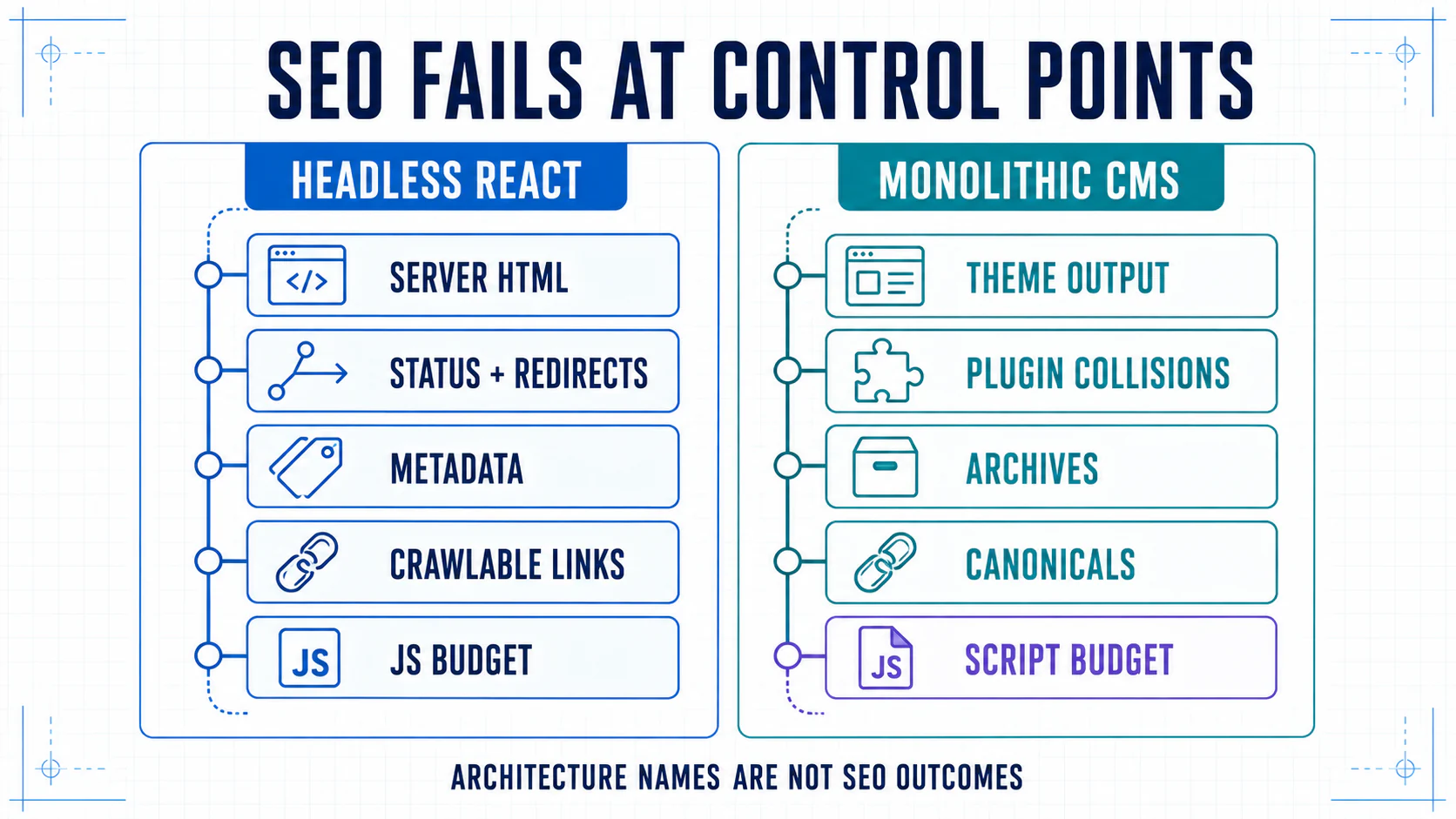
Google's JavaScript SEO guidance describes crawling, rendering, and indexing as distinct phases and recommends server-side or pre-rendering because it helps users and crawlers. Headless teams should not make primary content depend on user interaction or an unreliable client request. Monolithic teams should not assume server output compensates for duplicate URLs, weak metadata, or poor content structure.
Performance comparison
Headless React can produce very fast sites when it combines server or static output, bounded APIs, route-level code splitting, image optimization, and disciplined hydration. It can also ship excessive JavaScript and wait on several uncached services.
A monolithic CMS can be fast with efficient templates, full-page caching, a CDN, optimized media, and a controlled plugin set. It can also suffer from database contention and extension overhead.
Compare real field LCP, INP, CLS, TTFB, error rate, and cache hit rate on representative journeys. The current web.dev rendering guide explains why static, server, client, and hydration strategies carry different tradeoffs; even server rendering can add TTFB or leave substantial hydration work in the browser. Architecture names are not performance measurements.
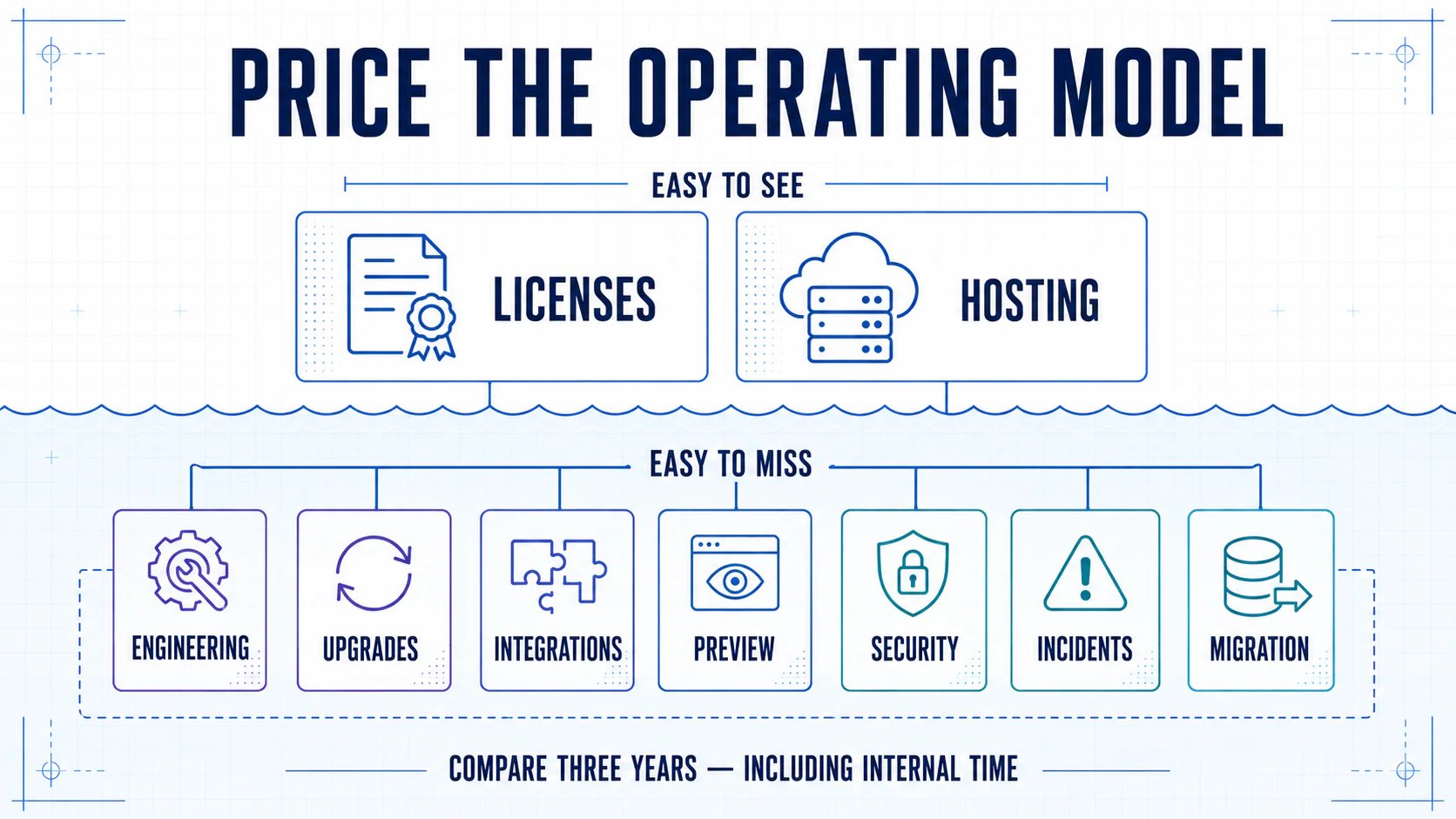
Cost and risk comparison
Headless cost centers
- frontend engineering and framework upgrades;
- CMS, search, commerce, DAM, and hosting vendors;
- integration adapters and contract tests;
- preview, orchestration, cache invalidation, and observability;
- security across tokens, APIs, webhooks, and the supply chain.
Treat the public API surface as an operated security boundary. The OWASP API Security Top 10 includes authorization, authentication, resource consumption, misconfiguration, inventory, and unsafe API-consumption risks that belong in design and testing—not only a prelaunch penetration test.
Monolithic cost centers
- platform licenses, hosting, plugins, and specialist support;
- theme and extension customization;
- performance and upgrade work around shared internals;
- migration cost when platform constraints become binding;
- risk concentrated in one runtime and plugin ecosystem.
Model total cost over three years, including internal ownership and expected change—not only year-one licenses.
Choose headless React when
- several channels or sites need the same structured content;
- the experience is a product interface, not just a set of pages;
- multiple markets need controlled shared and local data;
- integrations are central to the customer journey;
- separate teams need independent release cycles;
- the organization can own frontend and platform operations.
Choose a monolithic CMS when
- the website is one primary channel with common page types;
- non-technical editors need full page-building immediately;
- the launch window and budget are tight;
- there is no durable frontend platform team;
- existing plugins solve integrations adequately;
- operational simplicity is more valuable than composability.
Consider a hybrid approach when
The choice is not always binary. A CMS can continue to render most pages while React powers a configurator or account area. A headless frontend can migrate one route group at a time behind a shared CDN. A commerce platform can own checkout while a separate content frontend owns discovery. Modern React frameworks also mix server and client work within one route; Next.js, for example, documents server and client component boundaries rather than requiring an all-client application.
Define boundaries by user journey and system of record. A hybrid without clear ownership becomes two architectures to maintain rather than a safe transition.
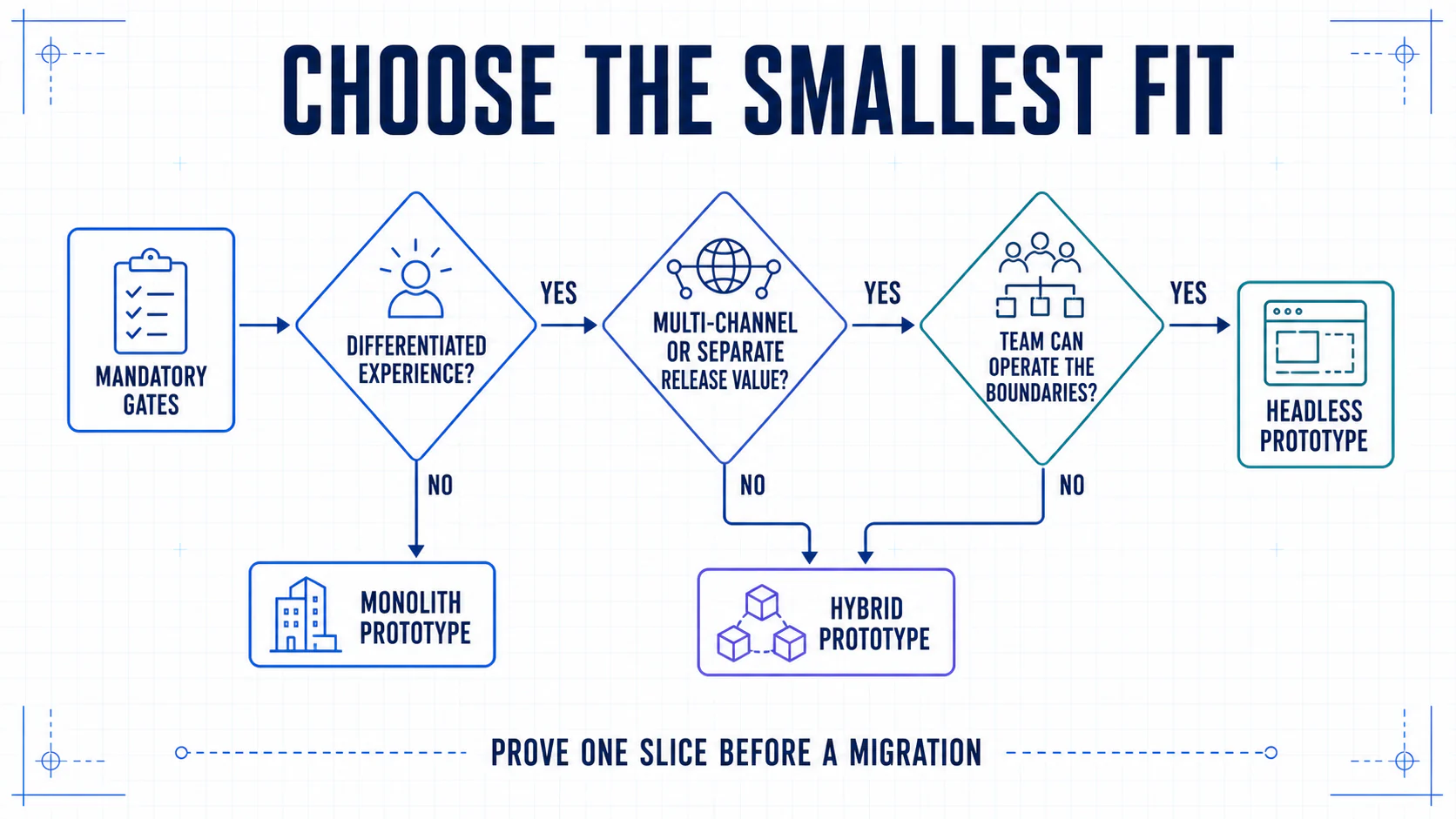
A decision workshop
Start with mandatory gates: launch-blocking editorial, security, compliance, SEO, accessibility, data residency, and rollback requirements. An option that fails a mandatory requirement should not be rescued by its average score.
For the eligible options, score each from 1 to 5 for:
- required channels and locales;
- experience complexity;
- editorial workflow;
- integration depth;
- rendering and performance control;
- security and compliance constraints;
- available engineering capacity;
- three-year operating cost;
- migration and rollback risk;
- vendor portability.
Weight the criteria before scoring and make the weights total 100. If editorial speed matters twice as much as frontend freedom, the model should show it. Every rating should point to a test, quote, architecture note, cost estimate, or documented assumption.
Decision artifact: Download the Headless vs Monolith Decision Brief (Markdown). It combines mandatory gates, weighted scoring, separate content and code release paths, a three-year cost inventory, a one-slice prototype, risk ownership, and a compact architecture decision record.
The practical answer
Choose headless React for governed composability and differentiated digital products. Choose a monolithic CMS for integrated delivery of conventional sites. Avoid using React as a reason by itself and avoid keeping a monolith only because migration feels difficult.
The headless architecture benefits guide explains the broader operating model. If the decision concerns commerce specifically, compare platforms in Best Headless Ecommerce Platforms. Our headless React architecture service turns the decision into a scoped migration, rendering, and content-delivery plan.